Garage · service log
Car maintenance log with reminders
Add your car once and keep its whole life in the app: mileage, service with parts, fuel, expenses, tires and inspections — with reminders by date or mileage that arrive as notifications.


Free, with or without Premium. Up to 20 cars; sign in to keep the garage on every phone.
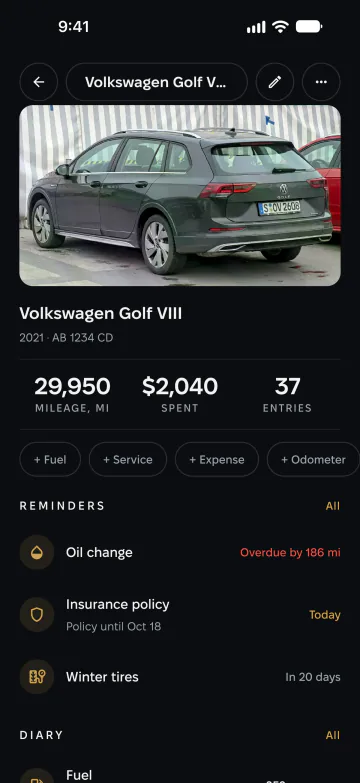
What the garage keeps
-
A diary of the car
Service with parts, fuel, expenses, odometer readings, tires, inspections and notes — each with its date.
-
Reminders that arrive
By date, by mileage or both — oil change, insurance, inspection — as a notification when it is due.
-
Costs and statistics
What you spent and drove, the cost per kilometre or mile, fuel and fill-ups, by category and by month.
-
Linked to the catalog
Link a car to its modification and its full specs are a tap away — or simply type it in.
How it works
-
Add your car
Pick it from the catalog or type it in, then add the mileage and a photo if you like.
-
Log what happens
Service, fuel, expenses, tires — the mileage of the car follows from your entries.
-
Get reminded
Set a reminder by date or mileage, or start from a standard service interval.
Why keep a service log
A complete history makes a car easier to maintain and easier to sell: a buyer trusts a car whose every service is written down. And you never have to remember when the oil was last changed.
The garage is free. Keep up to 20 active cars, and archive the ones you sold so their history stays with you.
One garage on every phone
Without an account, the garage belongs to the phone you created it on. Sign in with Google or Apple and it moves to your account, so it follows you to any phone.
Questions about the garage
Is the garage free?
Yes, completely — the diary, the reminders and the statistics are free, with or without Premium.
How many cars can I add?
Up to 20 active cars. Archived cars don’t count, so you can keep the ones you sold for the record.
Will reminders arrive if I don’t open the app?
Yes — they come as push notifications at the hour you choose. Allow notifications for Car Catalog in your phone’s settings.
What happens to my garage when I change phones?
Sign in with the same account on the new phone and the garage is there. Without an account, it stays with the old phone.

Start your car’s diary
Get Car Catalog and add your car in a minute.

Scan it with your phone’s camera — the code opens the right store.