VIN decoder · open registers
VIN decoder and car check by VIN or plate
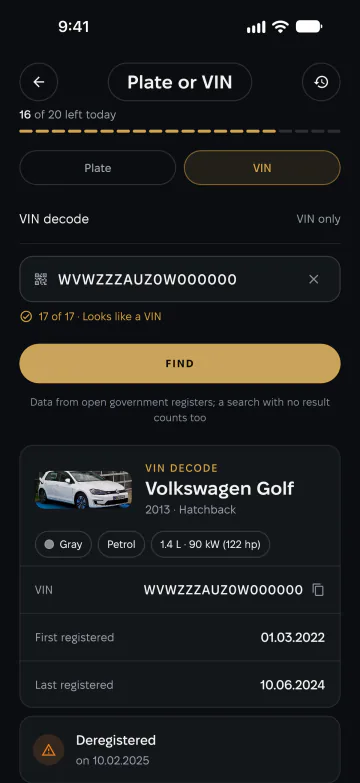
Type the 17 characters of a VIN — or a number plate where the country’s register allows it — and Car Catalog decodes the car, asks the open registers and puts the answers on one card: alerts first, then the history and the facts.


Part of Premium, with a free account. Plate checks depend on the country; VIN decoding works for any car.
What a check shows
-
Alerts first
Signals such as “reported stolen” or inconsistent mileage come at the top, highlighted, before anything else.
-
History and facts
Registration events on a timeline and the facts each source returned — body, paint, fuel, engine and inspections, where they are published.
-
The car itself
The decoded VIN points to the matching cars in the catalog, with the full specs of the generation and its modifications.
-
Your checks, kept
Every check that found a car stays in your history: open it again without spending a check, or delete it at any time.
How it works
-
Enter a VIN or a plate
The app checks the VIN as you type — 17 characters, without I, O or Q. Where plates are supported, switch to the plate.
-
The registers answer
Car Catalog asks the public registers of your country and the services that decode any VIN, then merges their answers.
-
Read one card
Alerts, the timeline, facts per source with their dates, earlier cars on the same plate and the matches in the catalog.
What a VIN is and where to find it
A VIN — vehicle identification number — is a 17-character code that belongs to one car. It encodes the manufacturer, the model, the model year and the plant where the car was built, followed by its serial number.
You will find it at the bottom of the windscreen on the driver’s side, on the sticker in the door pillar, under the bonnet and in the registration document. Make sure the VIN on the car matches the one in the papers: a difference is a reason to stop.
Where the check works
Decoding a VIN — make, model, year and plant — works for any car. Checks in national registers depend on what each country publishes: some open the registration history and inspections, some answer by plate, some only by VIN.
The app checks in the country set in its regional settings and shows the check only when that country is covered, so you never pay for an empty answer. For VINs of cars sold in the US it also shows open recalls.
Before you buy a used car
A check takes a minute and can save you from the most expensive mistakes. Look out for:
- a “reported stolen” alert, or a VIN that does not match the documents;
- mileage that goes backwards between inspections;
- a model year, engine or body that differs from the advert;
- registration events that do not fit the seller’s story.
Questions about the VIN check
Is the VIN check free?
The check is part of Premium and needs a free account; the number of checks per day is shown in the app. Reading and deleting your history needs only the account.
Can I check a car by its number plate?
Where the country’s register answers by plate — yes. In other countries the app checks by VIN, and decoding a VIN works everywhere.
Which countries are covered?
Those whose registers publish their data openly. The app checks in the country set in Settings → Region and offers the check only when that country is covered.
Is a VIN check enough to buy a car?
It is a strong first filter, not a guarantee. Registers can be incomplete — always inspect the car and its documents, ideally with a mechanic.
Do you keep the plates and VINs I check?
Your checks are kept in your own history, which you can delete at any time; our technical logs store plates and VINs only masked. Details are in the Privacy Policy.

Check a car before you buy it
Get Car Catalog, sign in and run your first check in a minute.

Scan it with your phone’s camera — the code opens the right store.